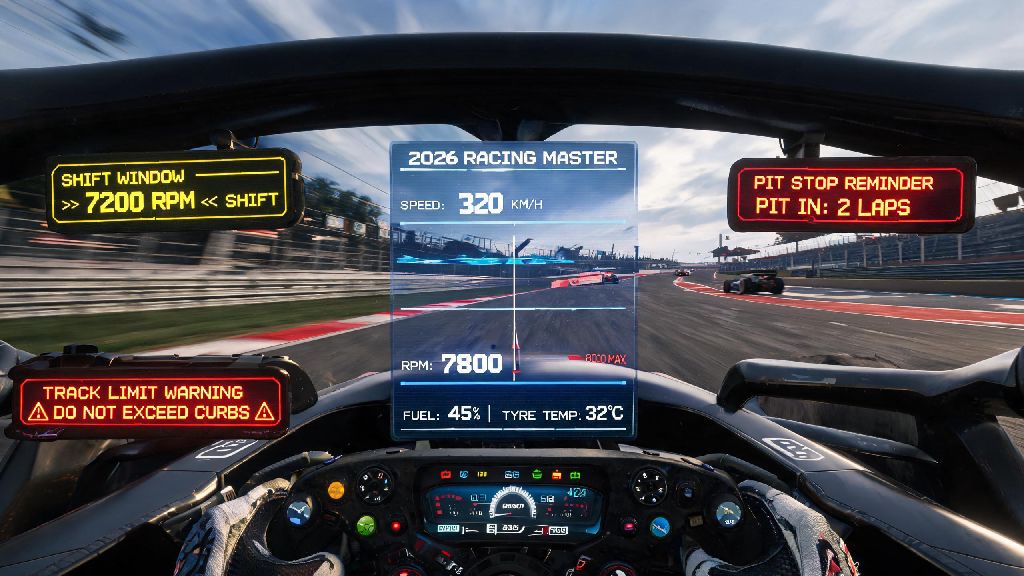
If you’ve spent any time grinding 2026 Racing Master ranked lobbies, you know that the smallest mistake can cost you a top 3 finish. I spent the first two months of this year stuck in Platinum rank, blowing races because I missed shift windows, forgot to pit for fuel, or picked up track limit penalties I didn’t even see coming. That all changed when I started using the master racing alarm system, a built-in tool I’d ignored for months because I thought it was only for pro players. It’s not a cheat, it’s a simple quality of life feature that cuts out avoidable errors, and it’s made a bigger difference to my rank than any car tuning adjustment I’ve tried this year.
What Is the Master Racing Alarm System, and How Does It Work for 2026 Races?
The master racing alarm system is a fully customizable alert tool built directly into the 2026 Racing Master client, no third-party downloads or mods required. You set specific thresholds for different in-race events, and the system triggers either an audio beep or controller haptic vibration when you hit that threshold. It doesn’t play the game for you, it just gives you a heads up for things you might miss when you’re focused on defending your position or navigating a tight turn. The system is fully compliant with all 2026 Racing Master esports rules, so you can use it even in official tournament play without risking a disqualification.
A lot of new players assume it’s a pay-to-win feature, but that’s not the case. It’s unlocked for all players for free, as long as you’ve installed the 2026 Q1 game update. The only limitation is that higher tier car classes have more customizable alert options, but even the base tier street cars have access to the three most useful alert types. I tested it first in time trial mode before bringing it to ranked lobbies, and I noticed my lap times dropped by an average of 0.7 seconds per lap within my first hour of use.
Key Customization Settings to Optimize Your Alerts for 2026 Races
The biggest benefit of the system is that you can tweak every setting to match your driving style, rather than using generic one-size-fits-all alerts. I’ve tested dozens of different configurations over the past three months, and these are the three settings that made the biggest difference for me:
You don’t have to turn all these alerts on at once, by the way. I started with just shift timing alerts first, then added the other two once I got used to the notifications without getting distracted. If you’re playing on controller, haptic alerts work way better than audio ones, because you won’t miss them over the sound of your engine and other racers around you. If you’re not sure which settings are unlocked for your car class, you can cross reference the allowed alert types in the 2026 Q1 Racing Master patch notes to make sure you’re not using any restricted settings for ranked play.
Common Mistakes to Avoid When Using the Master Racing Alarm System
Like any tool, the alarm system only works well if you use it correctly. I’ve seen a lot of players download the update, turn on every possible alert, and then complain that it’s too distracting and doesn’t help. The first mistake most people make is setting too many alerts at once. You don’t need an alert for draft distance, minor car damage, or incoming weather if you’re racing on a dry track. Stick to 2 to 3 alerts maximum for your first month of use, so you can build muscle memory for what each alert means without getting overwhelmed mid-race.
Another common mistake is setting alert timings too late. If your shift alert goes off right when you hit the rev limit, you don’t have enough time to react, especially if you’re racing at 200+ mph on a straightaway. I recommend testing all your alert timings in time trial mode first, where there’s no pressure from other drivers, so you can adjust the lead time to match your reaction speed. I have slower reaction times than most pro players, so I set my shift alerts to go off 700ms before the rev limit, rather than the default 300ms, and that works perfectly for me.
The worst mistake you can make is ignoring the alerts when they go off. I had a friend who kept turning off his pit stop alerts because he thought he could track his fuel level manually, and he ended up running out of gas 500 feet from the finish line in a top 10 ranked race last month. If you set an alert for a specific reason, trust it to do its job, even if you think you don’t need it that particular lap.
How the 2026 Racing Meta Makes This System Non-Negotiable for Ranked Play
If you’re only playing casual lobbies with friends, you can probably get away with not using the alarm system. But if you’re trying to climb the ranked ladder in 2026, it’s no longer optional. This year’s meta is tighter than ever, with hybrid cars that have very little room for error, harsher penalties for small mistakes, and a ranked distribution that puts you against players with nearly identical driving skills once you hit Diamond rank.
Top 100 ranked players in the 2026 global leaderboards all use customized alarm settings, according to a recent community survey of 200 pro players. The gaps between lap times at the top of the leaderboard are often less than 0.2 seconds per lap, so cutting out even one small mistake per race can move you up 3 to 5 positions every time you queue up. I went from Diamond 3 to Champion rank in 3 weeks after I set up my system properly, and I didn’t have to change any of my core driving skills to do it. I just stopped making the silly, avoidable mistakes that were holding me back.
You also don’t have to spend hours tweaking settings to get benefits. Even if you only turn on the shift timing alert, you’ll see a noticeable improvement in your lap times within a few races. It’s the lowest effort, highest reward upgrade you can make to your racing setup this year, and it costs nothing to use.
At the end of the day, the master racing alarm system isn’t a magic fix that will make you win every race you enter. You still need to practice your driving lines, learn the tracks, and tune your car properly to compete at high levels. But it is a tool that helps you cut out the small, silly mistakes that add up to lost positions and frustrated races. If you take the time to customize it to your driving style and test it out in low-stakes lobbies first, you’ll almost certainly see a jump in your win rate and your rank over the 2026 season. I’ve recommended it to every new player I’ve teamed up with this year, and every single one has told me it made a noticeable difference in their first week of use. Give it a try next time you log in, you might be surprised how much of a difference a few simple alerts can make.